
English · Norsk bokmål · Polski · 日本語 · 简体中文 · Español
🎧 Listen to voice examples · SSML-H conversations
Hangry Labs OmniVoiceTTS
Easy-to-run, massively multilingual text-to-speech Docker images with a responsive browser UI, HTTP API, voice design, voice cloning, saved profiles, SSML, and SSML-H included.
License notice: the source code is Apache-2.0, but upstream describes the default OmniVoice pretrained checkpoint as CC-BY-NC, so the default model is not licensed for commercial use. The embedded Higgs Audio 2 tokenizer has separate Boson and Meta Llama 3 terms, including an expanded-license threshold above 100,000 annual active users. Review the repository’s Third-Party Notices before use or redistribution.
Quick Start
Run the full offline-friendly image with an NVIDIA GPU:
docker run --name omnivoicetts --restart unless-stopped -p 7861:7861 --gpus all -e CUDA_VISIBLE_DEVICES=0 -v omnivoicetts_data:/app/persistent hangrylabs/omnivoicetts:latest
Run on CPU:
docker run --name omnivoicetts --restart unless-stopped -p 7861:7861 -e OMNIVOICE_DEVICE=cpu -e OMNIVOICE_LOAD_ASR=0 -v omnivoicetts_data:/app/persistent hangrylabs/omnivoicetts:latest
Open http://localhost:7861. The browser UI and APIs share the same port; interactive API documentation is at http://localhost:7861/tts/docs.
All shell commands below are one physical line for Bash, PowerShell and Windows
Command Prompt. These GPU, CPU and tiny commands are alternative deployments.
For access only from this machine, use -p 127.0.0.1:7861:7861.
The named omnivoicetts_data volume stores model assets, application settings, and saved voice profiles across container replacement and image updates.
CPU mode is a fallback path and requires substantial system RAM. Include a reference transcript when cloning (ref_text) and save transcripts with voice profiles to avoid loading ASR solely to transcribe the reference. Keep OMNIVOICE_LOAD_ASR=0 and the default OMNIVOICE_MAX_CONCURRENT_GENERATIONS=1 for the lowest practical CPU footprint. Measured scenario guidance is maintained in benchmarks/memory/cpu/BENCHMARKS.md.
CPU TTS defaults to FP16. Enable System > CPU precision > Use FP32 on CPU for potentially faster CPU inference with higher TTS-weight RAM usage. The choice persists in the data volume and applies to CPU API calls too; GPU precision is unchanged. Set OMNIVOICE_CPU_FP32=1 to change the startup default when no System preference has been saved. Earlier CPU memory baselines used FP32, so compare the same precision mode.
The smaller latest_tiny image downloads model assets on first use and keeps them in the same persistent volume:
docker run --name omnivoicetts-tiny --restart unless-stopped -p 7861:7861 --gpus all -e CUDA_VISIBLE_DEVICES=0 -e HF_HUB_OFFLINE=0 -e TRANSFORMERS_OFFLINE=0 -v omnivoicetts_data:/app/persistent hangrylabs/omnivoicetts:latest_tiny
The full image incrementally seeds its pinned baked model cache into this volume at startup. Existing downloaded models, saved voices, and settings are preserved across image upgrades.
Image Tags
| Tags | Contents | Updates |
|---|---|---|
latest |
Full image with pinned model assets baked in | Moving snapshot |
latest_tiny |
Same application, models downloaded on first use | Moving snapshot |
v1.0, v1.0_tiny |
Published full and tiny release | Immutable |
For a reproducible full-image deployment:
docker run --name omnivoicetts --restart unless-stopped -p 7861:7861 --gpus all -e CUDA_VISIBLE_DEVICES=0 -v omnivoicetts_data:/app/persistent hangrylabs/omnivoicetts:v1.0@sha256:f25ac241784a0133842e8a983808ed0ca8d6d2dd942b7fc02c37eecb7cf5c012
The matching tiny release is
hangrylabs/omnivoicetts:v1.0_tiny@sha256:b2bd5dbf6f861bbf5cc3591c3e4658995f62befad1acb65610f8369f538394a6.
Use it in the tiny command above when a fixed version is required. These are
top-level OCI index digests, also available from
ghcr.io/hangry-labs/omnivoicetts with identical tags and digests. Versioned
tags, Git tags and published GitHub Releases are immutable; rolling tags can move.
MCP
Enable the compact local-agent endpoint in System > MCP access, then connect to http://localhost:7861/mcp/. It exposes five focused tools for health, languages, saved voices, speech inspection, and recommended simple generation.
The separately controlled http://localhost:7861/mcp/advanced/ endpoint adds SSML/SSML-H, voice design, one-off reference cloning, and saved-profile management. Keep it disabled unless an agent needs those larger schemas. Both endpoints are off by default, have no separate application authentication, and should be enabled only for trusted clients or behind an authenticated reverse proxy. UI choices persist in omnivoicetts_data.
MCP generation returns expiring download links rather than embedding audio in model context. When connecting from another machine, set OMNIVOICE_MCP_BASE_URL to the externally reachable server origin. Advanced local reference files belong in /app/persistent/mcp-input.
What You Get
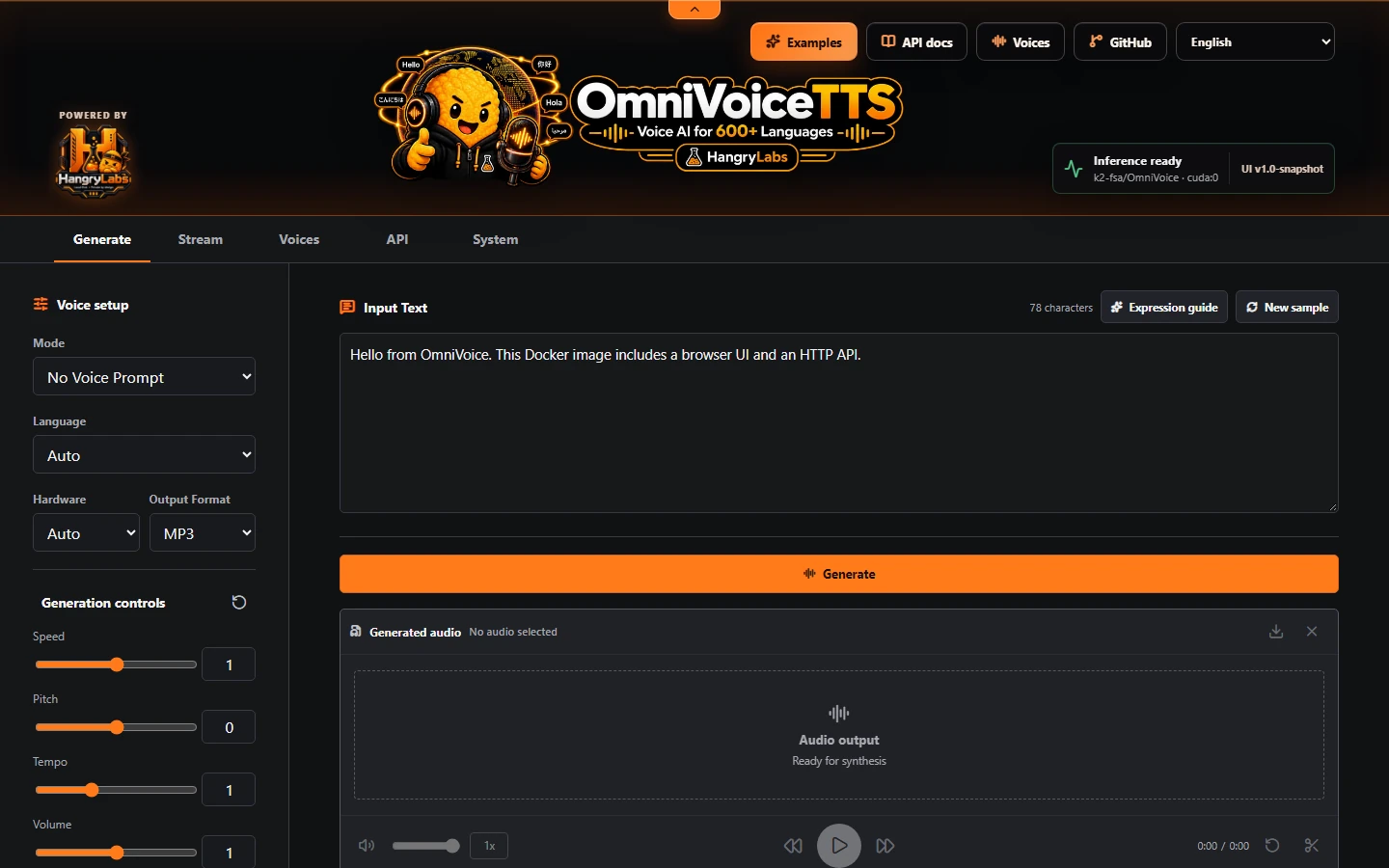
- Generate and progressive Stream workspaces with local waveform playback, seeking, speed, volume, trimming, download, and sharing
- No-prompt voices, voice design, direct cloning, and reusable saved voice profiles
- Reference-audio diagnostics and automatic safe edge-silence repair during default clone preprocessing
- Explicit plain text, SSML, and SSML-H modes, including dynamic multi-character dialogue
- Browser UI in 60 display languages, six README translations and 600+ model languages
- WAV, MP3, FLAC, and OGG output
- OpenAI-compatible speech and model-discovery routes
- Native generation, conversion, streaming, profile, status, and memory-management APIs
- Live NVIDIA GPU telemetry and CUDA allocator diagnostics
- Offline-friendly full image after the image is pulled
The voice gallery has 20 speech languages, ten voice-variety samples per language, randomized introductions and cross-language clones. The separate conversation showcase includes three SSML-H dialogues with transcripts and copyable source.
Hear samples before downloading the image:
OmniVoiceTTS language examples · SSML-H conversations
API
Native WAV generation:
curl -X POST "http://localhost:7861/tts/generate" -H "Content-Type: application/json" -d '{"text":"Hello from Hangry Labs OmniVoiceTTS.","language":"English"}' -o hello.wav
OpenAI-compatible MP3 generation:
curl -X POST "http://localhost:7861/v1/audio/speech" -H "Content-Type: application/json" -d '{"model":"tts-1","voice":"nova","input":"Hello from a local OpenAI-compatible endpoint.","response_format":"mp3"}' -o speech.mp3
The model-discovery endpoint reports the local omnivoice model. Compatibility names such as tts-1, tts-1-hd, and gpt-4o-mini-tts remain accepted by speech requests but do not represent separate loaded models.
Standard SSML and SSML-H 1.0 are supported by native routes through an explicit input_type:
curl -X POST "http://localhost:7861/tts/generate" -H "Content-Type: application/json" -d '{"input_type":"ssml","text":"<speak version=\"1.1\" xml:lang=\"en-US\">Hello.<break time=\"300ms\"/><prosody rate=\"slow\">This uses SSML.</prosody></speak>","output_format":"mp3"}' -o ssml.mp3
SSML-H adds bounded dynamic voice definitions, request-only characters, reusable profile publication, and multi-speaker turns while retaining standard SSML structure. The browser UI includes valid starter documents. Query GET /tts/ssml/capabilities for supported controls and limits.
Useful endpoints:
- API documentation: http://localhost:7861/tts/docs
- Process health:
GET /tts/ping - Model readiness:
GET /tts/ready - Runtime, queue, timing, and memory status:
GET /tts/status - Tokenizer-backed text estimate:
POST /tts/preflight - Uploaded one-off clone reference:
POST /tts/generate-upload - Saved voices:
GET /tts/voices - Progressive audio:
POST /tts/streamorPOST /tts/stream-chunks - Release unused CUDA allocator blocks:
POST /tts/cache/clear - Unload cached models and prompts:
POST /tts/purge
Runtime Settings
| Setting | Default | Purpose |
|---|---|---|
OMNIVOICE_DEVICE |
auto |
Select the inference device; use cpu for CPU mode |
CUDA_VISIBLE_DEVICES |
Unset | Select which NVIDIA GPUs the container can see |
OMNIVOICE_LOAD_ASR |
0 |
Keep reference-transcription ASR lazy rather than eager |
OMNIVOICE_CPU_FP32 |
0 |
Opt into FP32 CPU TTS weights; a saved System preference takes precedence |
OMNIVOICE_MAX_CONCURRENT_GENERATIONS |
1 |
Serialize inference per resolved device to limit memory growth |
HF_HUB_OFFLINE, TRANSFORMERS_OFFLINE |
Full: 1; tiny: 0 |
Allow missing model downloads when set to 0 |
OMNIVOICE_ENABLE_MCP |
0 |
Enable the compact MCP endpoint at startup |
OMNIVOICE_ENABLE_ADVANCED_MCP |
0 |
Enable the larger advanced endpoint at startup |
OMNIVOICE_MCP_BASE_URL |
http://localhost:7861 |
Set a client-reachable origin for generated artifact links |
Generation defaults, CPU precision and MCP access can be changed in System and persist in
the data volume. Device, ASR preload and concurrency changes require container
replacement. /tts/cache/clear releases unused allocator blocks without unloading
models or saved prompts; /tts/purge unloads cached models and prompts.
Saved Voices And Data
Create reusable cloned voices in the browser Voices workspace, then use the saved profile name as voice in compatible clients or as voice_profile in extended requests. Profiles with a supplied transcript avoid ASR work when their clone prompt is prepared.
The unified /app/persistent volume contains:
/app/persistent/models/huggingface- model assets/app/persistent/app/settings.json- persisted operator settings/app/persistent/voices/openai- saved profiles and reference audio/app/persistent/mcp-input- advanced MCP reference audio/app/persistent/mcp-output- expiring generated MCP audio
Path overrides are available through HF_HOME, OMNIVOICE_SETTINGS_PATH, and OMNIVOICE_OPENAI_VOICE_PROFILE_DIR. Device, eager ASR loading, concurrency, and other restart-bound controls remain environment variables.
Responsible Use
After image pulls and any required model downloads, inference runs on your own infrastructure. Audio, prompts and saved voice profiles can contain personal data. Keep the service and data volume accessible only to intended users.
OmniVoice supports voice cloning. Do not use this image for unauthorized cloning, impersonation, fraud, harassment, scams, or illegal or unethical activity. Only clone voices when you have the rights and consent to do so.
Licensing
The Docker images are mixed-license distributions. They include /app/NOTICE, /app/THIRD_PARTY_NOTICES.md, and a verifiable /app/third_party bundle with the reviewed model agreements, dependency notices, package inventory, and corresponding source for LGPL runtime components.
Built with Meta Llama 3
Built with Higgs Materials licensed from Boson AI USA, Inc., Copyright Boson AI USA, Inc., All Rights Reserved and Meta Llama 3 licensed under the Meta Llama 3 Community License, Copyright Meta Platforms, Inc., All Right Reserved
Links
- Product page and installation guide: https://hangrylabs.app/software/omnivoicetts
- Project website and documentation: https://hangry-labs.github.io/OmniVoiceTTS/
- Repository and full documentation: https://github.com/Hangry-Labs/OmniVoiceTTS
- Language examples: https://hangry-labs.github.io/OmniVoiceTTS/examples/
- SSML-H conversations: https://hangry-labs.github.io/OmniVoiceTTS/examples/ssml-h.html
- Hangry Labs: https://hangrylabs.app/
- SSML-H 1.0: https://hangrylabs.app/ns/ssml-h/1.0
- Upstream OmniVoice project: https://github.com/k2-fsa/OmniVoice
- Upstream model: https://huggingface.co/k2-fsa/OmniVoice
This is an independently maintained Hangry Labs packaging and serving fork of OmniVoice by k2-fsa and contributors. Original licenses and attribution are preserved. Hangry Labs maintains the Docker packaging, browser UI, APIs, documentation, release tooling, and related modifications in this distribution.