
English · Norsk bokmål · Polski · 日本語 · 简体中文 · Español
🎧 Listen to voice examples · SSML dialogue showcase
Hangry Labs KokoroTTS
Local Kokoro text to speech with a browser Studio, OpenAI-compatible and native HTTP APIs, and optional MCP tools in one Docker container. Run on NVIDIA GPU or CPU, with 173 voices across 11 language groups and five independently managed model packs.
Quick Start
Run the stable full image with NVIDIA GPU support:
docker run -p 7860:7860 --gpus all -v kokorotts_data:/app/persistent hangrylabs/kokorotts:v1.0@sha256:5afef5b9f3d779e56248992274d46a66c0715110eb09e47e1332c39951361f24
Or run on CPU:
docker run -p 7860:7860 -v kokorotts_data:/app/persistent hangrylabs/kokorotts:v1.0@sha256:5afef5b9f3d779e56248992274d46a66c0715110eb09e47e1332c39951361f24
Open http://localhost:7860. The Studio and APIs share the same port. Docker Desktop with Linux containers is supported on Windows; GPU use requires a working NVIDIA Container Toolkit/Docker GPU setup.
The full image includes all model families, voices and language assets for
offline use after pulling. The optional kokorotts_data volume preserves saved
settings and downloaded files when replacing containers. Without it, those files
live inside the current container.
Tiny image
The tiny image keeps the same UI and APIs but downloads model and voice files on first use. Keep its data volume so subsequent runs can reuse those assets:
docker run -p 7860:7860 --gpus all -v kokorotts_data:/app/persistent hangrylabs/kokorotts:v1.0_tiny@sha256:c8c044a2968cbd6cc49c811176fb856c000af324f8b01a027db91e38f1a863fa
Omit --gpus all for CPU use. Stable commands pin both the readable version and
published image digest. Docker Hub and GHCR publish matching images.
What You Get
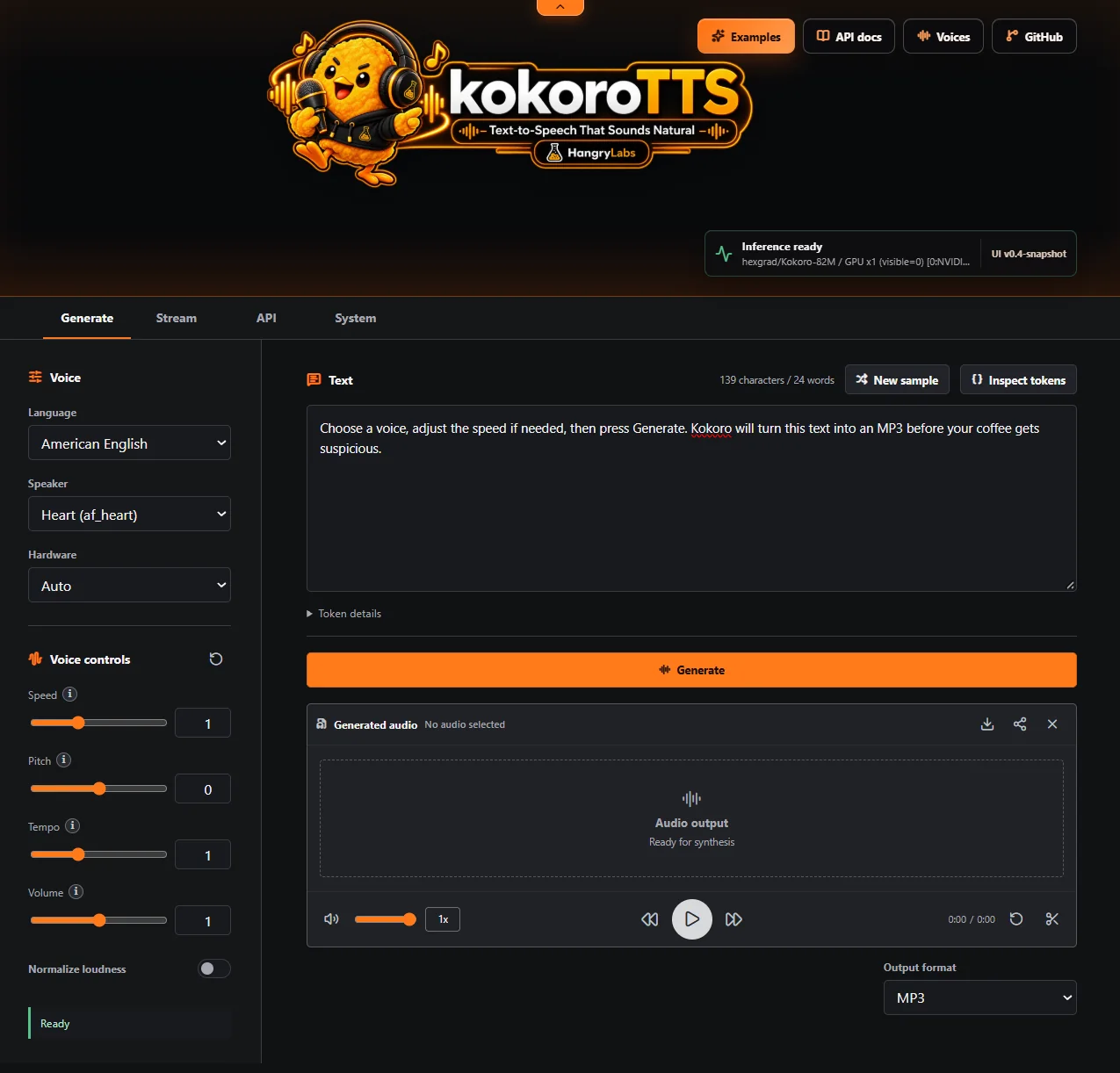
- Generate and Stream workspaces with waveform playback, seeking and downloads.
- 173 voices across American and British English, Japanese, Mandarin Chinese, Spanish, French, Hindi, Italian, Brazilian Portuguese, German and Vietnamese.
- Experimental native SSML for multi-character dialogue, language routing, prosody, explicit pauses and direct phonemes, with five complete recordings and copyable scripts in the dialogue showcase.
- Per-request speed, pitch, tempo, volume and normalization controls. Neutral defaults preserve ordinary synthesis.
- OpenAI-compatible and Kokoro-native APIs, progressive audio streaming, model discovery and interactive API documentation.
- WAV, MP3, FLAC, OGG Vorbis, Opus, AAC and raw PCM. The Studio and OpenAI API default to MP3; the native API defaults to WAV for compatibility.
- System controls for model packs, saved defaults and runtime/GPU status.
- Studio languages: English, Polish, Japanese, Chinese, Spanish and German.
- Optional MCP tools returning expiring audio links for AI agents.
Runtime Settings
| Setting | Purpose |
|---|---|
Port 7860 |
Studio, HTTP APIs and optional MCP on the same server. |
/app/persistent |
Optional data volume for model downloads, saved settings and temporary MCP audio. |
| System → model packs | Enable standard Kokoro, German Martin, German Victoria, Vietnamese or Chinese v1.1 independently. |
| System → Text chunking | Optional natural boundaries for non-English text, marked experimental and off by default. Applies to new requests from all clients; English is unchanged. Different boundaries can change pronunciation, pauses and quality. |
/app/persistent/app/settings.json |
Saved deployment settings managed through System and the settings API. |
KOKOROTTS_API_KEY |
Optional authentication for /v1/*; disabled by default. This does not protect native APIs or MCP. |
KOKOROTTS_ENABLE_MCP=1 |
Enable the opt-in /mcp endpoint on a trusted private network. |
KOKOROTTS_MCP_BASE_URL |
Public-to-the-caller server address used for generated audio links. |
All five packs are enabled by default. Model weights load into CPU/GPU memory on first use; disabling a pack releases its cached model after active generations finish. Voices sharing one checkpoint stay together: 54 standard voices, two independent German voices, 14 Vietnamese voices, and 103 Chinese v1.1/English voices. In the tiny image, a disabled custom model is not downloaded until its pack is enabled and called.
See the main guide for GPU selection, image details and persistence.
API Examples
OpenAI-Compatible API
Use this endpoint with applications and SDKs that support OpenAI text to speech. It returns MP3 by default:
curl -X POST "http://localhost:7860/v1/audio/speech" \
  -H "Content-Type: application/json" \
  -d '{"model":"kokoro","input":"Hello from Hangry Labs KokoroTTS","voice":"af_heart"}' \
  -o hello.mp3
Point the official Python client at http://localhost:7860/v1, use kokoro as the model, and use a voice id from GET /tts/voices. This API supports MP3, Opus, AAC, FLAC, WAV, and raw PCM. Optional authentication can be enabled by setting KOKOROTTS_API_KEY on the container; it is disabled by default for local use.
KokoroTTS Native API
Use the native API for pitch, tempo, volume, normalization, device selection, discovery, and segment streaming. It returns WAV by default for backward compatibility:
curl -X POST "http://localhost:7860/tts/generate" \
  -H "Content-Type: application/json" \
  -d '{"text":"Hello from Hangry Labs KokoroTTS","voice":"af_heart"}' \
  -o hello.wav
Request MP3 when you want compact output:
curl -X POST "http://localhost:7860/tts/generate" \
  -H "Content-Type: application/json" \
  -d '{"text":"Hello from Hangry Labs KokoroTTS","voice":"af_heart","output_format":"mp3"}' \
  -o hello.mp3
Optional audio controls are neutral by default and can be enabled per request:
curl -X POST "http://localhost:7860/tts/generate" \
  -H "Content-Type: application/json" \
  -d '{"text":"Hello from Hangry Labs KokoroTTS","voice":"af_heart","output_format":"mp3","pitch_semitones":2,"tempo":1.1,"volume":0.9,"normalize":true}' \
  -o hello-styled.mp3
Use another voice:
curl -X POST "http://localhost:7860/tts/generate" \
  -H "Content-Type: application/json" \
  -d '{"text":"ココロ テキスト読み上げへようこそ。","voice":"jf_alpha","output_format":"mp3"}' \
  -o kokoro-ja.mp3
POST /tts/convert is still available as a backward-compatible synthesis alias.
Health check:
curl http://localhost:7860/health/ready
Experimental SSML is opt-in on the native API and in the browser UI. Plain text remains the default:
curl -X POST "http://localhost:7860/tts/generate" \
  -H "Content-Type: application/json" \
  -d '{"input_type":"ssml","text":"<speak><voice name=\"af_heart\">Good morning.</voice><voice name=\"am_michael\">Coffee first?</voice></speak>","voice":"af_heart","output_format":"mp3"}' \
  -o dialogue.mp3
The supported experimental subset includes multi-voice dialogue with <voice>, explicit language routing with <lang>, optional per-segment <prosody speed="0.9" pitch="+2st" tempo="1.05" volume="0.9">, bounded <break>, <sub>, <say-as>, and direct IPA <phoneme> elements. Every prosody attribute is optional and omitted values do not change the sound. <lang> keeps the current voice and may retain its accent; <voice> selects an enabled native voice for reliable multilingual dialogue. Hidden model padding is removed between SSML turns: adjacent turns use a 100 ms default handoff, while <break> sets the complete pause and accepts 0ms for no gap. Open the SSML guide beside the UI mode button for exact rules and limits, or listen to five complete scripts on the public SSML examples page.
GET /tts/ping remains available for native API clients. Interactive API documentation is served at http://localhost:7860/tts/docs.
MCP for AI Agents
The opt-in MCP endpoint at /mcp exposes five intentionally simple tools: get_health, manage_model_packs, get_available_voices, talk_simple, and talk_advanced. Package management uses five explicit Boolean fields and confirms the complete resulting state. Voice discovery uses one required group number: 0 for every currently enabled voice or 1-5 for a specific checkpoint family. talk_simple needs only text, a self-contained default voice number from 1-11, and link TTL, so an agent can speak any supported language without a discovery call. talk_advanced accepts exact voice IDs and exposes format, SSML, speed, pitch, tempo, volume, and normalization. Generated audio is returned as an expiring HTTP link plus metadata, never as audio bytes or base64 in the MCP response. The complete request schemas, number mappings, and examples are in the repository README.
For a trusted private network, enable it and publish a link address reachable by the caller:
docker run -p 7860:7860 --gpus all \
  -e KOKOROTTS_ENABLE_MCP=1 \
  -e KOKOROTTS_MCP_BASE_URL=http://192.168.0.10:7860 \
  -v kokorotts_data:/app/persistent \
  hangrylabs/kokorotts:latest
Replace the example address with the KokoroTTS host. Connect the agent to http://<kokoro-host>:7860/mcp. MCP has no authentication in this release and is disabled by default; use it only on a trusted local/private network. The API key option for /v1/* does not protect MCP.
Image Tags
| Tag | Contents |
|---|---|
v1.0 |
Stable full image with baked model and voice assets. |
v1.0_tiny |
Stable runtime with assets downloaded on first use. |
latest |
Moving development full image. |
latest_tiny |
Moving development tiny image. |
Development snapshots also include Magic Studio: visual SSML-H dialogue
editing, individual turn previews, locked takes, audio assembly, and an
explicit-save script library. Saved scripts and audio workspaces use the same
optional /app/persistent data volume. Kokoro uses native voices and prosody;
neural voice design, cloning, and delivery instructions are not supported.
Use stable tag-plus-digest references for repeatable deployments. Moving tags remain unpinned and receive subsequent development builds.
Benchmarks
The repository includes repeatable speech-generation measurements and VRAM lifecycle measurements. Each report records the hardware, corpus and settings used; results depend on the selected language, checkpoint and deployment hardware.
Privacy and Responsible Use
Synthesis runs locally. The full image can run without network access; the tiny image needs network access to download missing assets before offline use. Protect sensitive input text and generated speech, and use voices and content you are authorized to use. Do not impersonate people or present synthetic speech as an authentic recording. Review generated output before publishing it.
Project Links
- Project website and documentation
- Voice gallery
- SSML dialogue showcase
- GitHub source
- Issues and support
- Hangry Labs
Docker Hub comments are not monitored regularly. GitHub Issues are the best place to report bugs.
Attribution
This is an independently maintained fork of the original Kokoro project by hexgrad:
https://github.com/hexgrad/kokoro
German synthesis uses the Apache-2.0 Kikiri German Martin and Victoria releases:
- https://huggingface.co/kikiri-tts/kikiri-german-martin
- https://huggingface.co/kikiri-tts/kikiri-german-victoria
Vietnamese synthesis uses the Apache-2.0 ContextBoxAI Kokoro Vietnamese model and Kokoro-Vietnamese integration:
- https://huggingface.co/contextboxai/Kokoro-Vietnamese
- https://github.com/iamdinhthuan/Kokoro-Vietnamese
Enhanced Mandarin and mixed Chinese-English synthesis uses the Apache-2.0 Kokoro v1.1 Chinese model and voices:
- https://huggingface.co/hexgrad/Kokoro-82M-v1.1-zh
KokoroTTS-owned and adapted upstream source remains Apache-2.0. The server
image is a mixed-license distribution containing GPL, LGPL, and other
third-party components. Commercial use is permitted, while redistribution
must follow the applicable notices, license, and corresponding-source terms.
Every full and tiny image includes a checksum-verified compliance bundle at
/app/third_party; details are maintained in the repository’s LICENSE and
third-party notices. Original Kokoro copyright remains with the
upstream authors; Hangry Labs maintains the Docker packaging, web UI/API
integration, examples page, documentation, release tooling, and other
modifications in this fork.