

English · Norsk bokmål · Polski · 日本語 · 简体中文 · Español
🎧 Listen to voice examples · SSML dialogues
Hangry Labs Melo TTS
Local, offline-friendly multilingual text to speech with a complete browser workspace, native HTTP API and OpenAI-compatible speech in one Docker image. Run a container, open the UI or connect your application, and start generating.
Quick Start
Full image with an NVIDIA GPU:
docker run --rm -p 8888:8888 --gpus all -v melotts_data:/app/persistent hangrylabs/melotts:latest
Open http://localhost:8888. The browser workspace and API share the same port. Interactive API documentation is at http://localhost:8888/tts/docs.
The full image bakes six core model families: EN, EN_V2, EN_NEWEST, FR,
ZH and JP. These cover English, French, Chinese and Japanese. Core inference
can run offline after the image is pulled. The named melotts_data volume keeps
model caches and operator settings across container and image replacement.
For CPU execution, omit --gpus all:
docker run --rm -p 8888:8888 -e TTS_DEVICE=cpu -v melotts_data:/app/persistent hangrylabs/melotts:latest
CPU execution and NVIDIA CUDA are supported. Other accelerator backends are not
advertised without hardware for end-to-end validation. For a specific NVIDIA
GPU, replace --gpus all with --gpus "device=1". For access only from this
machine, replace the port mapping with -p 127.0.0.1:8888:8888.
Smaller English-family image
docker run --rm -p 8888:8888 --gpus all -v melotts_data:/app/persistent hangrylabs/melotts:latest_en
This image bakes the three English model generations: EN, EN_V2 and
EN_NEWEST. It uses the same browser workspace, API and persistent volume.
The full, CPU and English-family commands are alternative deployments.
Optional Spanish and Korean
Spanish and Korean are not baked into either image. In System > Optional online
packs, review the upstream terms and choose Accept, download, and enable.
The first activation needs internet. The checkpoint, encoder, acceptance marker
and enabled setting stay in melotts_data, so subsequent starts can reuse them
offline. Disabling a pack releases it from memory while preserving its files.
What You Get
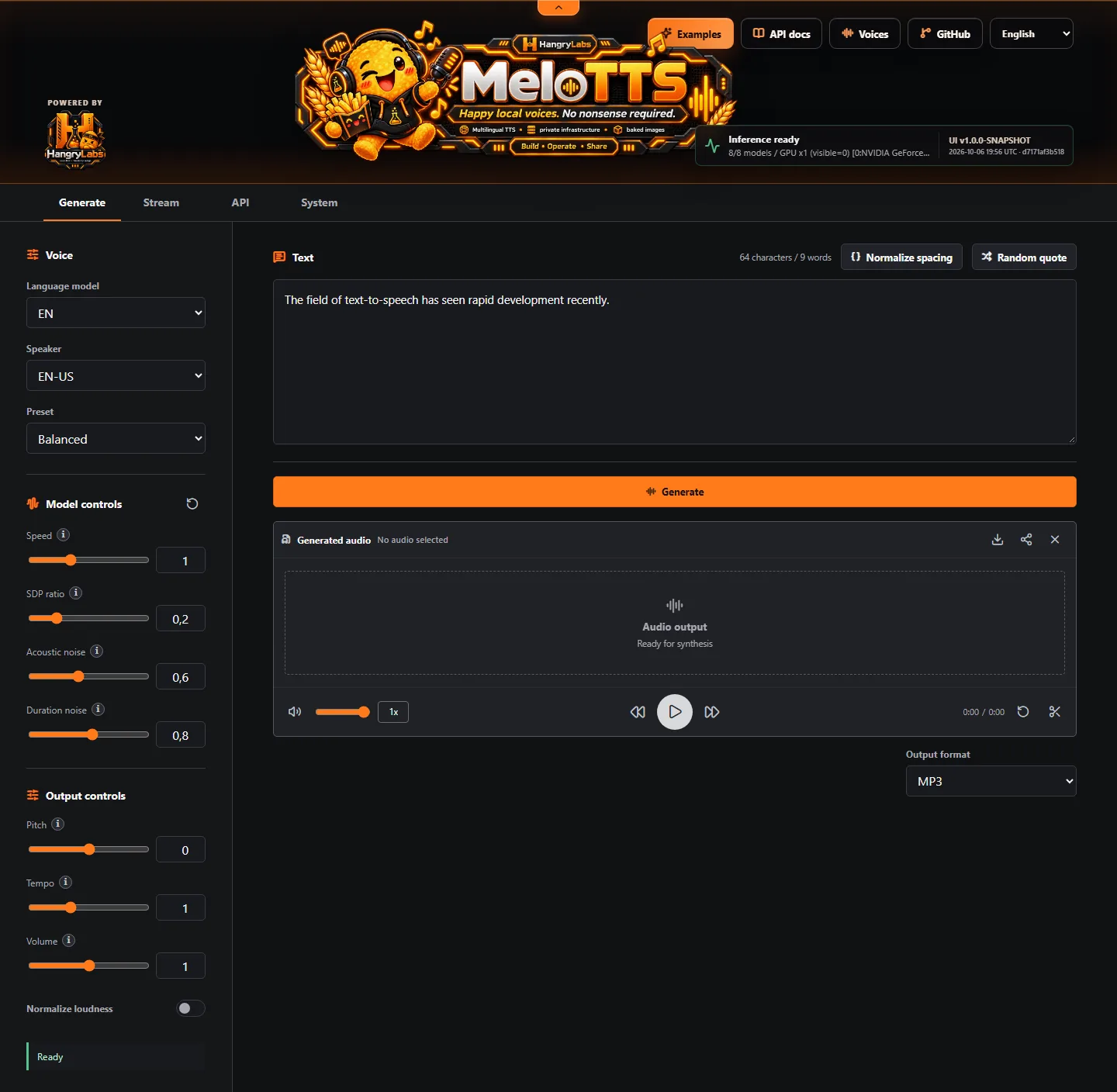
- Generate: language, speaker and preset selection, synthesis speed and variation controls, whitespace normalization and compact MP3 output by default.
- Stream: sentence-level generation for earlier audio delivery, with the same language and voice controls. The model does not emit decoder-frame audio.
- Audio workspace: waveform playback, seeking, volume, playback speed, trimming and download.
- Output controls: optional pitch, tempo, volume and loudness normalization. Neutral settings avoid the extra effects pass.
- Experimental SSML: explicit opt-in mode for loaded voices, language changes, per-segment prosody, pronunciation substitutions and exact pauses.
- API: native generation and streaming, OpenAI-compatible speech/model/voice discovery and backward-compatible WAV defaults for native requests.
- System: model residency, load/purge controls, optional packs, live API data and demand-driven NVIDIA GPU telemetry.
- Local assets: bundled browser scripts, fonts, WebP artwork and offline core model assets. No CDN is needed for the browser workspace.
The browser UI supports English, Spanish, French, Japanese, Chinese and Korean. The public website separately offers six README locales. The voice gallery has 13 recordings across languages, model generations and English accents; the SSML showcase adds five multi-voice, multilingual and directed dialogues with copyable scripts. Spanish and Korean gallery recordings demonstrate the optional packs.
API
OpenAI-compatible clients use http://localhost:8888/v1. The default speech
response is MP3. The following JSON command examples use Bash quoting:
curl -X POST "http://localhost:8888/v1/audio/speech" -H "Content-Type: application/json" -d '{"model":"melotts","input":"Hello from Hangry Labs Melo TTS.","voice":"EN-Newest","response_format":"mp3"}' -o hello.mp3
Discover the local models at GET /v1/models and loaded voices at
GET /v1/audio/voices. Generic melotts resolves duplicate English speakers in
EN_NEWEST, EN_V2, then EN order. Select a discovered melotts-<language>
model for exact routing. Set MELOTTS_API_KEY to protect /v1 routes with bearer
authentication; this does not protect the entire browser/native service.
Native generation keeps WAV as its default for backward compatibility:
curl -X POST "http://localhost:8888/tts/generate" -H "Content-Type: application/json" -d '{"text":"Hello from Hangry Labs Melo TTS.","language":"EN","speaker_id":"EN-BR"}' -o hello.wav
Set format to choose WAV, MP3, FLAC, OGG, Opus or AAC. Discover formats at
GET /tts/formats. Native synthesis controls include speed, sdp_ratio,
noise_scale, noise_scale_w, pitch_semitones, tempo, volume and
normalize. The browser offers the same controls. Legacy
POST /tts/convert/tts remains accepted; use POST /tts/generate for new clients.
Streaming
curl -X POST "http://localhost:8888/tts/stream" -H "Content-Type: application/json" -d '{"text":"First sentence. Second sentence.","language":"EN","speaker_id":"EN-BR","stream_format":"mp3"}' -o stream.mp3
Native streaming defaults to raw mono pcm_s16le at the model sample rate.
MP3 uses one continuous encoder fed by sentence audio. Discover supported formats
at GET /tts/stream-formats. OpenAI MP3 and PCM use this sentence-level path;
Opus, AAC, WAV and FLAC are returned as complete files.
Experimental SSML
Choose input_type=ssml explicitly on native routes. Plain text remains the
default; OpenAI-compatible speech accepts plain text only.
curl -X POST "http://localhost:8888/tts/generate" -H "Content-Type: application/json" -d '{"input_type":"ssml","text":"<speak><voice name=\"EN-BR\">Good morning.</voice><break time=\"250ms\"/><voice name=\"EN-US\">Hello there.</voice></speak>","language":"EN","speaker_id":"EN-BR","format":"mp3"}' -o dialogue.mp3
The bounded subset includes speak, voice, lang, prosody, break,
sub and say-as. Voice/language choices require loaded models. Adjacent speech
turns use a compact 100 ms handoff; an explicit break selects the complete pause,
including 0ms. The orange SSML mode button opens the in-app rules guide.
Discovery and operations
| Route | Purpose |
|---|---|
GET /tts/ping |
Lightweight process liveness |
GET /health/ready |
Service readiness |
GET /tts/status |
Loaded models and runtime state |
GET /tts/defaults |
Native request defaults |
GET /tts/languages, /tts/speakers, /tts/voices |
Available language/voice catalogs |
POST /tts/metrics |
Generation measurement response |
POST /tts/load |
Restore configured models after purge |
POST /tts/purge |
Unload resident models |
Runtime Settings And Persistence
| Setting | Default | Purpose |
|---|---|---|
TTS_DEVICE |
auto |
Select the inference device; use cpu for CPU mode |
TTS_LANGUAGES |
Full: EN,EN_V2,EN_NEWEST,FR,ZH,JP; English: EN,EN_V2,EN_NEWEST |
Core model families loaded at startup |
MELOTTS_API_KEY |
Unset | Optional bearer protection for /v1 routes |
MELOTTS_PERSISTENT_ROOT |
/app/persistent |
Root for baked-cache seeding and persisted data |
HF_HOME |
/app/persistent/models/huggingface |
Model cache |
MELOTTS_SETTINGS_PATH |
/app/persistent/app/settings.json |
Optional-pack choices and acceptance |
Configured core models load during startup. Full startup can take time; poll
/tts/ping with retries. Inference is serialized with model loading/purging.
Select core residency with TTS_LANGUAGES; Spanish and Korean are managed by
persisted System settings instead. Keep the data volume mounted when replacing
containers. Device and startup-language changes require container replacement.
Image Tags
| Tags | Contents | Updates |
|---|---|---|
latest |
Full image, six baked core model families | Moving snapshot |
latest_en |
Three English model families | Moving snapshot |
v1.0.1, v1.0.1_en |
Published full and English-family release | Fixed release |
For a reproducible full-image deployment:
docker run --rm -p 8888:8888 --gpus all -v melotts_data:/app/persistent hangrylabs/melotts:v1.0.1@sha256:f0da2ebce41283a5d2dae7125d4776522f95995abdad80773eb2b200fdd1292b
The matching English-family image:
docker run --rm -p 8888:8888 --gpus all -v melotts_data:/app/persistent hangrylabs/melotts:v1.0.1_en@sha256:870488904a21cf2e128d80230371270b19dd2a4ea84d70f5505a84afe1bb642f
These are top-level OCI index digests. The same tags and digests are available
from ghcr.io/hangry-labs/melotts. Rolling latest and latest_en remain
deliberately unpinned. The older v0.1.0 release predates mirrored GHCR version
tags and remains available from Docker Hub.
Privacy And Responsible Use
After the required image/model downloads, inference runs on your own infrastructure. Text and generated audio can contain personal information. Restrict the service and data volume to intended users, and use text and voices only with the necessary rights. Do not use generated speech for deception, fraud, harassment or unlawful impersonation.
The optional API key covers /v1 routes only. Protect broader network access
with your own authenticated reverse proxy when needed.
Attribution And License
This is an independently maintained fork of the original MeloTTS by Wenliang Zhao, Xumin Yu, Zengyi Qin, MyShell.ai and contributors. Hangry Labs maintains the Docker packaging, browser workspace, APIs, documentation and related runtime changes.
The combined application is AGPL-3.0-only, including inherited Bert-VITS2-derived material. Private and commercial use are permitted. If you distribute a modified image or expose a modified Melo TTS service over a network, offer its users the complete corresponding source. Original model, dictionary, dependency and browser-component terms remain applicable; optional encoder terms must be reviewed separately. See the license and Third-Party Notices.
Project Links
- Project website and documentation
- Product overview and installation
- Voice examples
- SSML dialogues
- Repository
- Issues and Discussions
- Hangry Labs
Docker Hub comments are not monitored regularly. Report bugs through GitHub Issues. To provide or sponsor accelerator test hardware, use GitHub Discussions.